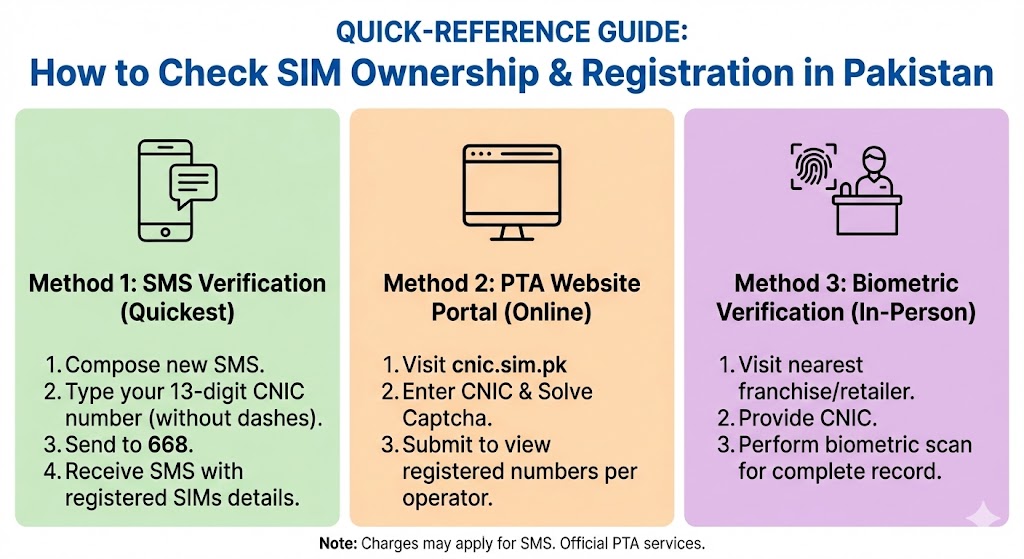
In Pakistan, mobile SIM cards must be registered under a valid CNIC to protect users from identity theft, fraud, and misuse. Because your SIM is linked to banking codes, apps, and personal communication, it is important to regularly check whether any unknown numbers are registered under your CNIC.
To help you stay safe, here is a simple quick-reference guide on how to check SIM ownership and registration details in Pakistan.
Why Checking SIM Registration Matters
Keeping track of SIMs registered to your CNIC is essential because:
-
Someone may register a SIM using your identity without your knowledge.
-
Misused SIMs can be involved in fraud, scams, or illegal activities.
-
Banks and government services rely on your verified number for OTPs and alerts.
-
It ensures you stay in full control of your digital identity.
A five-minute check can prevent big problems later.
1. What You Need Before Checking
You only need two things:
-
Your 13-digit CNIC number (without hyphens)
-
A mobile phone with SMS or internet access
That’s it. No extra documents or registrations are required.
2. How to Check SIM Registration Through the Official Portal
The official SIM verification portal allows you to check all mobile numbers registered under your CNIC.
Steps:
-
Visit the official SIM information system website.
-
Enter your CNIC number.
-
Complete the verification step (such as CAPTCHA).
-
View the full list showing:
-
Number of SIMs
-
Which operators they belong to
-
This method provides the most complete overview.
3. How to Check SIMs Registered Under Your CNIC via SMS
If you prefer a faster, offline method:
Steps:
-
Open your phone’s messaging app.
-
Type your CNIC number (13 digits).
-
Send it to the designated verification short code.
-
Receive an instant reply containing:
-
Count of SIMs registered under your CNIC
-
Network-wise breakdown
-
This is the easiest method for quick checks.
4. What to Do If You Find Unknown SIMs
If the list includes numbers you did NOT register:
Take immediate action:
-
Visit the customer service center of the relevant mobile operator.
-
Bring your original CNIC.
-
Request the blocking or deactivation of unknown SIMs.
-
Ask for a confirmation receipt or SMS.
-
Change passwords for apps such as banking, email, or social media if you suspect misuse.
Never delay — unauthorized SIMs pose a direct security risk.
5. Tips to Keep Your SIM Information Safe
-
Check your SIM registration every 3–6 months.
-
Never let someone else register a SIM with your CNIC.
-
Avoid sharing OTPs, banking codes, or verification numbers.
-
Deactivate old or unused SIMs when switching to another network.
-
Keep your CNIC photocopies safe and never hand them out casually.
Your mobile identity is as important as your physical ID.
FAQs: SIM Ownership & Registration Check in Pakistan
1. Why should I check SIM registration under my CNIC?
Checking helps ensure no unauthorized SIMs are being used under your identity, protecting you from fraud, scams, and misuse of your personal data.
2. What information can I see when I check SIM registration?
You can see:
-
How many SIMs are registered under your CNIC
-
Which mobile networks those SIMs belong to
-
Whether the numbers match the ones you personally use
3. Do I need internet to check SIM ownership?
Not always. You can use either:
-
The official online portal
-
The SMS method, which works without internet
4. Can I check someone else’s SIM registration?
No. You can only check SIMs registered under your own CNIC for privacy and security reasons.
5. What should I do if I find a SIM I don’t recognize?
Immediately:
-
Visit the nearest service center of the operator
-
Bring your original CNIC
-
Request deactivation or blocking of the unknown number
-
Get written or SMS confirmation
6. How often should I check SIM ownership?
Every 3–6 months is recommended. This helps detect unauthorized registrations early.
7. Can someone register a SIM using my CNIC without my permission?
Yes, it is possible if:
-
You shared your CNIC copy
-
Someone misused your details
-
A retailer registered a SIM fraudulently
That’s why regular checking is important.
8. Will checking SIM registration affect my current number?
No. Checking does not deactivate or change your number. It only shows information.
9. What documents do I need to block an unknown SIM?
You typically need:
-
Your original CNIC
-
A visit to the operator’s customer service center
No additional documents are required.
10. Can I block a SIM online?
Blocking usually requires in-person verification, so most networks ask you to visit a service center for security reasons.
11. Is this process free?
Yes, checking SIM registration and blocking unauthorized SIMs is free of cost.
12. Is it safe to share my CNIC number for SIM checking?
Yes, if you share it only through the official portal or the official SMS code.
Never share your CNIC on unsafe sites or with unknown individuals.
Conclusion
Checking SIM ownership and registration in Pakistan is simple, fast, and essential for protecting your identity. With just your CNIC, you can verify how many SIMs are linked to your name and take action immediately if anything looks suspicious.
This quick-reference guide helps you stay safe, secure, and fully in control of your mobile number.